
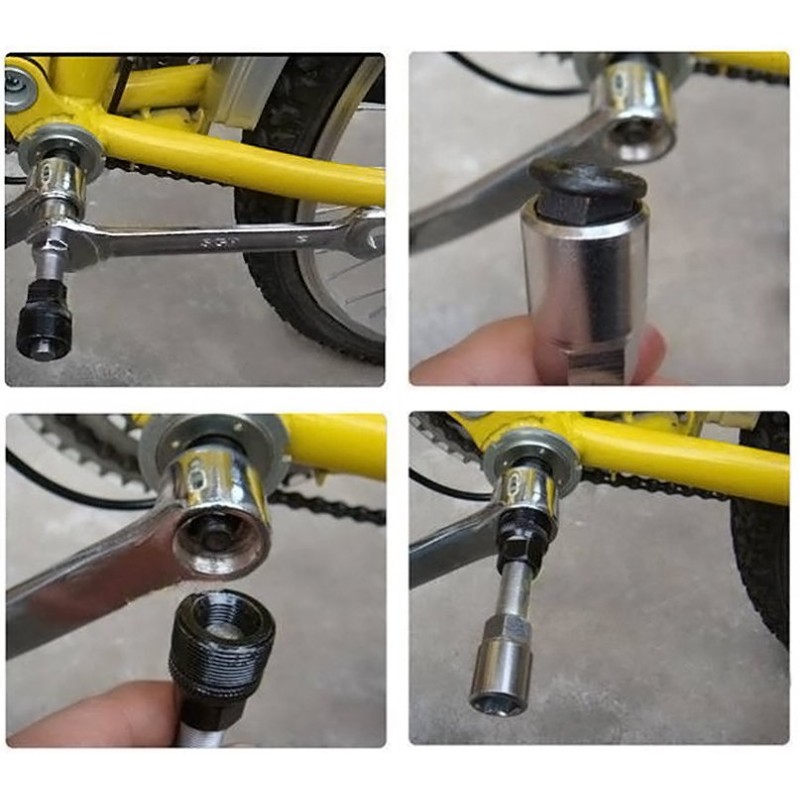
Tool Azimut Uni for Octalink/ISIS Cranks
search
  • Tool Azimut Uni for Octalink/ISIS Cranks
  • Tool Azimut Uni for Octalink/ISIS Cranks
  • Tool Azimut Uni for Octalink/ISIS Cranks

Tool Azimut Uni for crank removal and installation Octalink/ISIS

€3.37
Tax included
Quantity

Product code
2099900000133
Manufacturer
AZIMUT ACS

Description

Tool for removing and installing cranks. An adapter is required when using it with an Octalink-type bottom bracket spindle.

Technical specifications

  • For a 14 mm hex key and a 15 mm wrench
  • Length: 8.6 cm (with OCTALINK adapter)
  • Weight: 130 g

Instructions

Additional tools required:

  • 1. If present, remove the cap covering the crank bolt.
  • 2. Unscrew the bolt using the silver part of the tool and a 15 mm wrench (or a hex key).
  • 3. Unscrew the black part of the tool almost all the way.
  • 4. Screw it into the opening from which you removed the crank bolt. If your bottom bracket spindle is Octalink type, use the adapter.
  • 5. Using a hex key or a 15 mm wrench, turn the silver part of the tool clockwise until the crank comes off.

Caution! Before using additional tools, first slowly turn them by hand to engage the thread correctly. Applying force immediately with a 15 mm wrench or hex key may damage the crank thread.